If you've been building with Agent Skills, you've probably noticed that every skill you touch falls into one of two buckets. Each exists for a good reason, and each runs into a limit the other doesn't.
Let me name the two types, name the trade-off each one makes, and then describe the category that sits between them: the one that closes the gap with a single extra file.
First, a quick refresher on how Skills work
A Skill is just a folder with a SKILL.md file inside it. The file has YAML frontmatter (name, description) and a markdown body with instructions the agent follows.
---
name: investigate-incident
description: Triage a production alert. Pull metrics and logs, correlate with recent deploys, summarize, and escalate
---

When an alert fires:
1. Identify the affected service and severity...
2. Pull the relevant dashboards and logs...
3. Correlate with recent deploys...
The clever part is progressive disclosure. At startup, the agent only loads each skill's name and description into context. That's cheap. When a task matches a description, the agent reads the full SKILL.md into context and follows it. If the body references other files, the agent reads those on demand too. So you can keep dozens of skills on hand and pay almost nothing until one is actually used.
That "read other files on demand" behaviour is the hook we're going to exploit later. Hold onto it.
Type 1: Fully generic skills
These are the ones you download from a marketplace like skills.sh. "Write conventional commits." "Review a diff for security issues." "Triage a production incident." They're written to work for everyone.
The trade-off: they know nothing about your environment.
A generic investigate-incident skill has no idea that your metrics live in Datadog and not Grafana, that the checkout service's dashboard is at a specific URL, that your logs are queried with a particular syntax, that paging goes through PagerDuty escalation policy POL-4F2A, or that incidents get posted to #incidents-prod.
So it produces a plausible, generic runbook that stops exactly where it gets useful. "Check your metrics dashboard." Which one? "Page the on-call engineer." Through what? The skill did nothing you couldn't have written on a napkin.
Type 2: Fully custom skills
These are the ones you write yourself, internally, for one specific team. They're great. They know your Datadog org, your dashboard IDs, your escalation policies, your Slack channels. They run the whole triage end to end without asking a single question.
The trade-off: they're locked to one team and one author.
You can't share them. Hand your custom investigate-incident skill to another team and every dashboard ID, schedule ID, and channel is wrong. Publish it and it's useless to anyone but you. You wrote a great procedure and then welded it to one team's infrastructure. Every team ends up re-inventing the same skill from scratch, because nobody's version transfers.
The missing category: generic skills that need customization
Here's the thing. Most useful skills are generic in their procedure and specific only in their details.
The steps of triaging an incident are the same everywhere: identify the service and severity, pull metrics, query logs around the alert window, correlate with recent deploys, summarize impact, escalate if it's bad enough. That algorithm is genuinely reusable. What differs per team is a bounded set of facts: which platform, which dashboards, which query syntax, which paging policy, which channel.
So the ideal skill isn't fully generic or fully custom. It's a generic procedure that gets customized to your environment, once. The problem has always been: where does that customization live, and who fills it in?
My answer is a single extra file you ship, SETUP.md, plus one it writes for you the first time the skill runs.
The solution: a SETUP.md that writes a CUSTOMIZATION.md
The idea is simple. Alongside SKILL.md, you ship exactly one more file:
SETUP.md: an interview script. The first time the skill runs on a team, it gathers the environment-specific facts (partly by scanning the repo, mostly by asking the user) and writes them into a new file calledCUSTOMIZATION.md.CUSTOMIZATION.md: the environment-specific facts (platform, dashboards, IDs, policies). You don't ship this one;SETUP.mdcreates it on first run, and from then on it's committed alongside the skill.
The SKILL.md body is instructed to always read CUSTOMIZATION.md first. If it doesn't exist yet, or a required field is still blank, the skill falls back to SETUP.md, interviews the user, writes CUSTOMIZATION.md, and only then proceeds.
The flow looks like this:
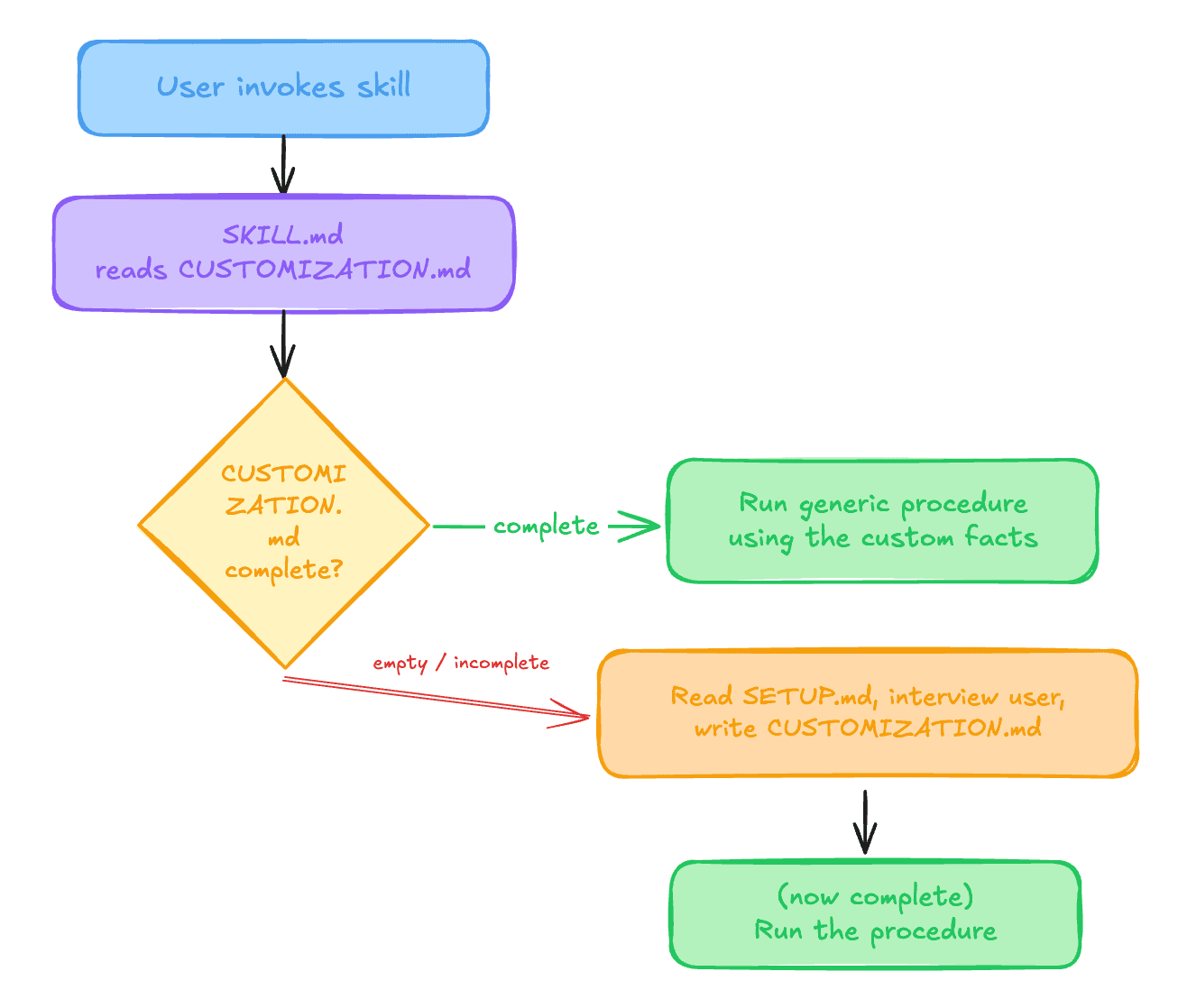
The first time anyone uses the skill on a team, they get a short guided setup. Every time after that (for them and for everyone else) it just works, because CUSTOMIZATION.md is committed to the repo.
The full structure
investigate-incident/
├── SKILL.md            # generic procedure + the "read customization first" logic
├── SETUP.md            # the interview that creates CUSTOMIZATION.md
└── CUSTOMIZATION.md    # NOT shipped; SETUP.md writes it on first run, then commits it
Let's write all three for real: the two you ship, plus the one setup produces.
SKILL.md
---
name: investigate-incident
description: Triage a production alert. Pull metrics and logs, correlate with recent deploys, summarize, and escalate
---

# Investigate Incident

## Step 0: Load customization (ALWAYS do this first)

Read `CUSTOMIZATION.md` in this skill's directory.

- If it does NOT exist, or any **Required** field below is missing or
  blank:
  → STOP the normal flow, read `SETUP.md`, and run the setup interview.
  Only continue once every Required field in `CUSTOMIZATION.md` has a
  value.

Required facts you must have before continuing:
- Observability platform + base URL
- Dashboard map (service → dashboard URL)
- Log query tool + example queries
- Service ownership map (service → team + Slack)
- Paging tool + escalation-policy IDs
- Incident channel
- Severity definitions

## Step 1: Scope the incident

From the alert, identify the affected `{{service}}` and grade its
severity against `{{severity_definitions}}`.

## Step 2: Pull signals

1. Open the dashboard for `{{service}}` from `{{dashboard_map}}` and
   read error rate, latency, and saturation over the alert window.
2. Query logs using `{{log_query_tool}}` with the saved query for
   `{{service}}` from `{{log_queries}}`, scoped to the alert window.
3. Correlate with recent deploys/changes.

## Step 3: Summarize and escalate

1. Write a summary: what's affected, blast radius, likely cause.
2. If severity ≥ the paging threshold in `{{severity_definitions}}`,
   page the on-call via `{{paging_tool}}` using the escalation policy
   for `{{service}}` from `{{escalation_policies}}`.
3. Post the summary to `{{incident_channel}}`.
Notice the body never hardcodes a dashboard, an ID, or a channel. It references {{placeholders}} that come straight out of CUSTOMIZATION.md. There's no templating engine here; the {{...}} are just cues telling the agent which fact to look up in CUSTOMIZATION.md and substitute as it reads. The procedure is generic; the facts are not, and most of those facts don't live in the codebase at all.
SETUP.md
This is the file that turns a generic skill into a customized one. It's a prompt the agent runs against the codebase and the user. Some of these facts are occasionally checked in as code, so it looks there first, but most live in external platforms, so it leans heavily on asking.
# Setup for investigate-incident

Your job is to produce `CUSTOMIZATION.md` so this skill matches THIS
team's production environment. Most of these facts are not in the
codebase; they live in Datadog, PagerDuty, Slack, etc. Some may be
checked in, though. Discover what you can, then ask the user for the
rest. Do not guess IDs or URLs.

If `CUSTOMIZATION.md` already exists but is missing some fields (for
example, a skill upgrade added new ones), only gather and fill the
missing fields; don't re-ask what's already there.

## Step 1: Scan for anything committed as code

Some of these facts are checked in more often than you'd think. Look
before asking:
- Monitors/dashboards-as-code (search for `datadog`, `grafana`,
  `*.tf` with `pagerduty_` resources).
- A service catalog, `CODEOWNERS`, or `service.yaml` for ownership.
- A `runbooks/` directory or links in the README.
- Existing scripts or CLIs in `scripts/`, `bin/`, or `package.json`
  that already talk to these tools (a Slack poster, a dashboard
  snapshot, a paging helper). Note the command and any keys it expects
  from `.env`; the skill will call it rather than reimplement it.
Record anything you find; flag it for the user to confirm.

## Step 2: Interview the user for the rest

Ask for the facts you couldn't find. Group the questions so it's a
30-second conversation, not an interrogation. For example:

> To wire up incident triage for your team, I need a few things that
> only live in your tools:
>
> 1. **Observability**: Datadog, Grafana, or something else? Paste the
>    dashboard URL for one or two of your busiest services.
> 2. **Logs**: which tool, and a saved query you trust for errors?
> 3. **Ownership**: which team owns which service, and the Slack handle
>    to ping?
> 4. **Paging**: PagerDuty or Opsgenie? What's the escalation-policy ID
>    per service, and at what severity should I actually page?
> 5. **Where should I post the incident summary?** (Slack channel)
> 6. **Existing scripts**: do you already have commands I should run
>    instead of doing this by hand, e.g. a dashboard snapshot or a
>    Slack poster? Give me the command; I'll call it (it can read its
>    own keys from `.env`).

## Step 3: Write the file

Write the confirmed values into `CUSTOMIZATION.md` (creating it if it
doesn't exist). Before you finish, check that every **Required** field
has a value; if any is still blank, ask for it now. Then tell the user:

> Setup complete. This is a one-time step; I've saved it to
> CUSTOMIZATION.md. Commit that file and the whole team gets it for free.

Finally, return to `SKILL.md` and continue the original request.
CUSTOMIZATION.md (after setup runs)
# Customization for investigate-incident

## Required
- **observability_platform**: Datadog
- **observability_base_url**: https://acme.datadoghq.eu
- **dashboard_map**:
    - checkout:  /dashboard/abc-123-checkout
    - payments:  /dashboard/def-456-payments
- **log_query_tool**: Datadog Logs
- **log_queries**:
    - checkout: `service:checkout status:error`
    - payments: `service:payments status:error`
- **service_ownership**:
    - checkout: Team Orders (#team-orders)
    - payments: Team Money (#team-money)
- **paging_tool**: PagerDuty
- **escalation_policies**:
    - checkout: POL-4F2A
    - payments: POL-9C1B
- **incident_channel**: #incidents-prod
- **severity_definitions**: |
    SEV1 = customer-facing outage → page immediately
    SEV2 = degraded, no full outage → page during business hours
    SEV3 = internal only → no page, file a ticket

## Optional
- **runbook_location**: docs/runbooks/
- **status_page_url**: https://status.acme.com

## Scripts (commands the skill should run, not just facts to read)
- **pull_dashboard_snapshot**: scripts/incident/snapshot.sh   # reads DD_API_KEY from .env
- **post_summary**: node scripts/incident/post-to-slack.ts    # reads SLACK_TOKEN from .env
The facts are filled in, and the next engineer who runs the skill skips setup entirely and gets a full end-to-end triage. One caveat: CUSTOMIZATION.md is committed, so keep it to non-sensitive identifiers (dashboard paths, policy IDs, channel names) and leave real credentials in your secret manager.
Customization can run code, not just fill in blanks
Every placeholder so far has been a plain fact: a URL, an ID, a channel. But nothing says a field has to be a value the agent reads. It can just as easily be a command the agent runs. CUSTOMIZATION.md can point the skill at scripts that already exist, and the procedure invokes them at the right step instead of describing the work in prose.
That's the difference between parameterizing a skill and enriching it. observability_base_url tells the agent where to look; a pull_dashboard_snapshot: scripts/incident/snapshot.sh entry tells it to actually run your snapshot tool, the one that already knows how to authenticate against Datadog. The skill doesn't reimplement that logic. It just learns that the command exists and calls it.
This is also how the pattern reaches the one class of fact a committed file can never hold: secrets. You would never write DD_API_KEY or SLACK_TOKEN into CUSTOMIZATION.md, because it's committed. But you can point the skill at a script that reads those keys from your .env at runtime. Setup asks "do you already have a command that pulls a dashboard snapshot, or posts to Slack, or pages on-call?", records the path, and from then on the procedure runs your code with your credentials, without a single secret touching the committed file.
Those scripts can live in either of two places, and setup handles both:
- In the skill folder, shipped next to
SKILL.md. Generic helpers the author provides so the procedure has working code out of the box. - In your codebase, existing tooling the setup step discovers or asks about and wires in. Your
scripts/, yourbin/, the CLI your team already runs by hand during an incident.
Why this is better
One skill, distributed once, works everywhere. You publish the generic procedure. It adapts itself to each team instead of shipping a runbook that dead-ends at "check your dashboard."
Setup is guided, not manual. Nobody hand-edits a config file guessing what a field means. The agent scans for what's checked in, then asks a focused set of questions for the facts that only exist in external tools. Far more reliable than a blank template.
The customization is versioned and shared. CUSTOMIZATION.md lives in the repo. Commit it once and every teammate, and every future session, inherits the setup. The one-time cost is paid by whoever runs it first. (This is the one precondition worth calling out: for the facts to be shared, the skill has to live in the repo (vendored into .claude/skills/ or similar), not installed only in your personal ~/.claude. If it's user-global, SETUP.md still customizes it for you; each teammate just runs setup once for themselves.)
It keeps context lean. These facts don't belong in AGENTS.md, where they'd load into every session for a skill you use once a week. They sit in the skill's own directory and load only when the skill runs, which is progressive disclosure all the way down.
Clean separation of ownership. The skill author owns the procedure and can improve it and re-publish. Each team owns its CUSTOMIZATION.md. Upgrading the skill doesn't clobber your local facts, and your local facts don't fork the procedure.
It's self-healing. When you migrate from Datadog to Grafana, or your escalation policies change, you blank the affected fields (or delete CUSTOMIZATION.md entirely) and the skill re-runs setup for whatever's missing. The procedure never rots because the volatile part is quarantined in one file.
Where else this pattern fits
Incident triage is the example I built out, but the shape is everywhere. Any skill with a universal procedure and a handful of external, un-inferable facts is a candidate. A few more:
-
Create-an-alert (monitoring-as-code). The procedure (write the alert definition, set thresholds, wire routing, open a PR) is identical across teams. What isn't: the notification channel IDs, the severity-to-routing map, the escalation-policy IDs, the naming convention. None of it is in the code, all of it is asked once.
-
Feature-flag rollout. Creating a flag, gating the code path, and setting a safe default is a fixed recipe. But the flag platform (LaunchDarkly, Statsig, Unleash), the project and environment keys, the naming convention, and the default rollout policy live in the flag service and in your team's head, not in the repo.
-
Deploy or roll back a service. Build, push, apply, verify, roll back on failure: same everywhere. The cluster names and kube-contexts, the namespace-per-environment map, the image registry, and the promotion flow (dev to staging to prod) are infrastructure facts that exist outside the app code and can't be inferred from it.
-
Notes-to-tickets. Turning a meeting or a bug report into a well-formed ticket is a generic transform. Where it lands is not: the Linear team ID or Jira project key, the assignee mapping, the label taxonomy, and the priority and estimate conventions are external identifiers plus a taxonomy no source file holds.
-
On-brand content generation. Drafting a post, a carousel, or release notes follows a repeatable structure. The brand voice, the color palette and fonts, the handle, and the signature call-to-action are pure preference. Code can never reveal them, and they belong to you, not to any single repo.
The common thread: in each case the steps transfer perfectly, but the skill dies at the first concrete detail unless someone tells it where your world lives. That "someone" should be a one-time SETUP.md, not a re-write.
The takeaway
Generic skills are reusable but ignorant. Custom skills are smart but trapped. The category we've been missing is the generic-procedure-with-a-guided-setup, and it takes exactly one file you ship to unlock: a SETUP.md that interviews for the facts the agent can't find on its own and writes them into a CUSTOMIZATION.md that remembers the answers for everyone who comes after.
The trick is knowing which skills need it. If the missing facts are in your code or your AGENTS.md, the agent already has them, so no setup is required. But when a skill depends on things that live only in your dashboards, your paging tool, and your team's head, it isn't reusable until you give it a SETUP.md.